IT Asset Management & Endpoint Management Services
Automated inventory tracking, lifecycle management, and endpoint security across 1,000+ devices - backed by a 99.9% uptime SLA and under-15-minute response times.


- ~1,000 Endpoints ManagedAutomated asset inventory and health monitoring across approximately 1,000 devices using NinjaOne RMM - servers, workstations, laptops, switches, and firewalls.
- 99.9% Uptime SLAContractually guaranteed availability backed by 24/7 hardware health monitoring, automated alerting, and proactive maintenance across the entire device fleet.
- <15-Minute Response TimeAverage response time under 15 minutes for hardware-related tickets, measured and tracked across 80 businesses on month-to-month agreements.
- Month-to-Month, No Lock-InZero long-term contracts required. Microsoft-certified and CompTIA-certified technicians delivering IT asset management with full flexibility to scale up or down.
What Is IT Asset Management and Endpoint Management?
IT asset management (ITAM) is the practice of tracking, maintaining, and optimizing every piece of hardware a business operates - from servers and workstations to switches, firewalls, and mobile devices. Endpoint management extends this by enforcing security policies, pushing software updates, and monitoring device compliance across the entire fleet, regardless of location.
Most businesses with 20 to 500 endpoints struggle to maintain accurate hardware inventories. Spreadsheet-based tracking breaks down as devices are added, moved, replaced, or retired. The result: unknown warranty expirations, unpatched firmware, shadow IT devices on the network, and emergency hardware replacements that cost 2-3x more than planned refreshes.
A managed approach automates the process. NinjaOne RMM discovers and inventories every device on the network continuously, tracking hardware specs, warranty dates, and health metrics like disk SMART status, CPU temperature, and memory utilization. Microsoft Intune handles device enrollment and compliance policy enforcement for Windows, macOS, iOS, and Android endpoints. Bitdefender GravityZone provides real-time endpoint protection across the fleet.
The lifecycle model follows 6 stages: procure, deploy, manage, maintain, refresh, and dispose. Each stage has defined processes - from vendor-agnostic procurement and zero-touch deployment to automated warranty alerting and secure IT asset disposition (ITAD).
This service benefits any organization managing physical IT infrastructure: manufacturing floors with rugged endpoints, law firms with compliance requirements, logistics operations with mobile devices in the field, and nonprofits that need to maximize hardware budgets. RIT currently manages approximately 1,000 endpoints across 80 businesses using this model.
No long term contracts
Month-to-month agreements backed by a 99.9% uptime SLA. We earn retention through measurable performance - response time, resolution rate, patch compliance - not contract penalties.
100+ years Hands-On Experience
Our Microsoft and CompTIA certified engineering team brings over 100 years of combined IT experience across endpoint security, cloud management, network infrastructure, and compliance.
100% Satisfaction Guarantee
Under 15-minute average response to a live engineer. 70-80% of support tickets resolved on first contact. If we cannot meet your expectations, you are free to leave - no penalties, no lock-in.
Available 24/7/365
24/7 remote monitoring through NinjaOne catches problems before they cause outages. Automated alerts for performance degradation, disk failures, security events, and missed patches - across every managed device.
Industries that rely on RIT for IT asset management and endpoint management
Hardware fleets and endpoint requirements vary by industry. These are the verticals we manage most often:
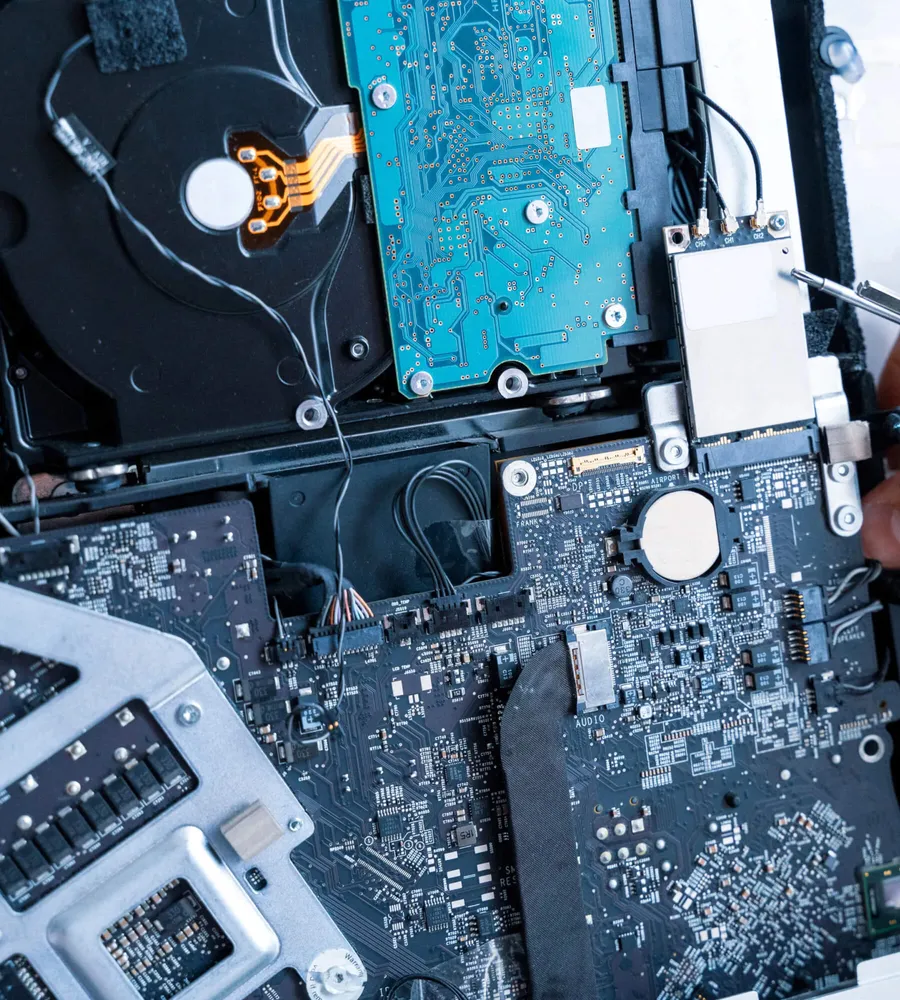
IT asset management and endpoint management services built for growing businesses
-
Automated Asset Inventory and Tracking
NinjaOne RMM continuously scans every connected device and builds a real-time hardware inventory - eliminating manual spreadsheet tracking that goes stale within weeks. Each asset record captures manufacturer, model, serial number, CPU, RAM, storage capacity, operating system version, and network configuration automatically.
The automated inventory flags discrepancies immediately. A new device appears on the network without an RMM agent? It shows up as unmanaged. A workstation drops offline unexpectedly? An alert fires within minutes. This level of IT asset tracking visibility is the foundation for every other hardware management function - procurement planning, lifecycle management, warranty tracking, and shadow IT detection all depend on an accurate, continuously updated asset database.
-
Hardware Procurement and Vendor Management
IT procurement through a managed provider eliminates the guesswork of matching hardware specifications to business requirements. The process starts with a needs assessment: What applications will the device run? What compliance requirements apply? What's the expected lifespan?
RIT sources hardware through a vendor-agnostic model, working with manufacturers like Dell, Lenovo, and HP to secure volume pricing without locking businesses into a single brand. Each device arrives pre-configured with the correct OS image, NinjaOne RMM agent, Bitdefender GravityZone endpoint protection, and Microsoft Intune enrollment - ready for production use on day one. Typical procurement-to-deployment timelines run 3-5 business days for standard workstation orders.
-
Workstation Deployment and Configuration
Every new workstation or laptop follows a standardized deployment process: OS imaging with a golden image baseline, driver installation, security agent deployment (NinjaOne + Bitdefender + Intune enrollment), application stack installation, and user profile configuration. This process applies identically whether the device is destined for an on-site desk, a remote worker's home office, or an operatory workstation in a dental office.
Zero-touch deployment through Microsoft Intune allows devices to be shipped directly to end users. The employee powers on the laptop, connects to the internet, signs in with Microsoft Entra ID credentials, and Intune automatically enrolls the device, pushes policies, installs applications, and enforces compliance settings - no technician hands-on required. This reduces deployment time from hours of manual configuration to approximately 30-45 minutes of automated setup.
-
Hardware Lifecycle Planning
Device lifecycle management tracks hardware from procurement through disposal across 6 defined stages: procure, deploy, manage, maintain, refresh, and dispose. Each stage has measurable milestones and automated triggers within NinjaOne.
The critical planning function is hardware refresh cycle management. Workstations reach optimal replacement at 3-4 years; servers at 4-5 years. Running hardware beyond these windows increases failure rates, degrades performance, and creates security exposure from unsupported firmware and expired warranties. NinjaOne flags devices approaching their refresh window based on purchase date, warranty status, and health trend data - converting reactive emergency replacements into planned, budgeted upgrades that cost significantly less.
-
Warranty Management and End-of-Life Alerts
NinjaOne automatically tracks warranty expiration dates for every managed device, pulling data from manufacturer databases and correlating it with each asset's service tag. When a warranty reaches its 90-day, 60-day, and 30-day expiration thresholds, automated alerts notify both RIT's team and the client.
End-of-life monitoring goes beyond warranty status. It tracks manufacturer support timelines - when a hardware model stops receiving BIOS/UEFI firmware updates, when replacement parts become unavailable, and when the device falls below minimum specifications for current operating systems. These alerts drive proactive lifecycle decisions rather than running equipment until it fails, which typically costs 2-3x more in emergency procurement and unplanned downtime.
-
Mobile Device Management (MDM)
Microsoft Intune manages Windows, macOS, iOS, and Android devices from a single console. Device enrollment happens automatically through Intune Autopilot (Windows) or Apple Business Manager (macOS/iOS). NinjaOne MDM provides additional management capabilities for Apple and Android devices, including app deployment and remote troubleshooting.
Microsoft Entra ID Conditional Access ensures only compliant devices access company resources. A laptop without current endpoint protection, an unencrypted phone, or a device running an unsupported OS version gets blocked automatically before connecting to email, SharePoint, or business applications. This policy enforcement applies equally to company-owned and BYOD devices, covering remote and hybrid workers without requiring VPN connections.
-
Hardware Health Monitoring and Alerting
NinjaOne RMM monitors hardware health metrics 24/7 across every managed endpoint: CPU utilization, disk SMART status, memory pressure, power supply health, event log anomalies, and temperature readings. Automated alert thresholds trigger when any metric crosses predefined boundaries - a disk showing SMART warnings, a server running above 90% CPU sustained, or memory consumption exceeding normal baselines.
These alerts reach RIT's team in real time, enabling intervention before a hardware component fails. The difference between catching a degrading SSD through SMART monitoring and discovering it after a crash is the difference between a planned $200 drive replacement during a maintenance window and a $5,000+ emergency recovery involving data restoration, expedited hardware shipping, and unplanned downtime.
-
Shadow IT Detection
Shadow IT - unauthorized hardware connected to the business network - represents one of the most common security gaps in organizations with 20-500 endpoints. Personal laptops without endpoint protection, consumer-grade wireless access points, and unapproved USB storage devices all create unmanaged entry points for malware, data exfiltration, and lateral movement attacks.
NinjaOne's automated network scanning compares every discovered device against the approved IT asset inventory. Devices without an RMM agent, without Bitdefender endpoint protection, or not enrolled in Microsoft Intune get flagged immediately. The alert includes device type, MAC address, IP address, and connection timestamp - giving enough data to identify and remediate the unauthorized device before it becomes a security incident.
-
New-Hire Hardware Provisioning
New employee onboarding requires a configured, secured, and ready-to-use device on day one. The provisioning process begins when HR or a manager submits a hardware request specifying the role, department, and application requirements. The device is either pulled from inventory or procured through the vendor pipeline, then configured following the standard deployment process.
Microsoft Intune zero-touch deployment makes this particularly efficient for remote hires. A pre-configured laptop ships directly to the new employee's address. On first boot, Intune enrolls the device, pushes the role-appropriate application stack, enforces security policies, and registers the device in NinjaOne's asset inventory. Total provisioning time from request to production-ready device: typically 3-5 business days, down from 1-2 weeks with manual processes.
-
Hardware Disposal and Decommissioning
IT asset disposition (ITAD) is the final lifecycle stage, and it carries the highest compliance risk if handled improperly. Decommissioned hardware still contains sensitive data on drives, cached credentials in firmware, and configuration data that could expose network architecture.
The secure disposal process follows a defined sequence: data sanitization following NIST 800-88 guidelines, removal of all management agents (NinjaOne RMM, Bitdefender, Intune enrollment), license deactivation and reclamation, asset record closure in the inventory database, and either certified recycling through an R2-certified vendor or secure destruction with documented chain of custody. This process supports compliance with HIPAA, PCI-DSS, and other regulatory frameworks that mandate data handling through end of asset life.
Explore How We've Helped Businesses Like Yours Thrive
Discover the tailored IT solutions that have helped other Chicagoland and Suburbs businesses streamline operations, enhance cybersecurity, and get back to focusing on growth. Don't wait until an issue arises - proactively secure your business today.
We understand small to mid businesses and they need their technology to work for them, not against them..."

Sid Rothenberg
President
How our IT asset management and endpoint management works
01
Discovery and Inventory Audit
The engagement begins with a full network scan using NinjaOne RMM to discover every connected device - servers, workstations, laptops, switches, firewalls, printers, and peripherals. Each device is cataloged with hardware specifications, operating system version, warranty status, and current health metrics. This initial audit typically uncovers 10-20% more devices than the client's existing inventory records show, including shadow IT endpoints that were previously untracked. The resulting asset database becomes the single source of truth for all lifecycle decisions.
02
Agent Deployment and Enrollment
Every approved device receives the full management stack: NinjaOne RMM agent for hardware monitoring and remote management, Bitdefender GravityZone agent for endpoint protection, and Microsoft Intune enrollment for device compliance and policy enforcement. Microsoft Entra ID Conditional Access policies activate to verify device compliance before granting access to business resources. Agent deployment across a typical 50-endpoint environment completes within 1-2 business days using NinjaOne's scripting engine for batch installation.
03
Baseline Configuration and Policy Enforcement
The configuration phase establishes standardized settings across the fleet: patch management schedules, firmware update windows, security policies (encryption enforcement, password requirements, screen lock timers), and application allowlists. Intune compliance policies define the minimum acceptable configuration - devices that fall out of compliance trigger automated remediation scripts through NinjaOne or lose access to company resources through Conditional Access until they return to baseline.
04
Ongoing Monitoring and Proactive Maintenance
After initial setup, NinjaOne monitors hardware health continuously. Automated alerts fire for disk degradation, memory failures, abnormal CPU temperatures, event log errors, and warranty expirations approaching their thresholds. Monthly maintenance windows handle firmware updates, BIOS patches, and driver updates that require a reboot cycle. Quarterly reviews assess fleet health trends, identify devices approaching their 3-5 year refresh window, and generate procurement forecasts for the upcoming budget cycle.
05
Lifecycle Refresh and Procurement
When NinjaOne's lifecycle tracking flags a device for refresh - based on age, warranty status, performance degradation, or end-of-life manufacturer notice - the procurement process initiates automatically. A replacement recommendation specifies hardware type, configuration, and estimated cost. Once approved, the new device is sourced, pre-configured with the standard deployment image, and swapped in during a scheduled maintenance window. The retired device enters the ITAD decommissioning pipeline for secure data sanitization and disposal.
06
Reporting and Continuous Optimization
Monthly reports delivered through NinjaOne dashboards cover: total assets by type and age, warranty status distribution, devices approaching refresh, alert volume and resolution times, patch compliance percentage, and endpoint security posture. These reports feed into quarterly strategy sessions where fleet composition, procurement forecasts, and budget allocation for the next refresh cycle are reviewed. The data-driven approach replaces guesswork with measurable lifecycle planning tied to actual hardware performance data.
Platforms and tools powering our IT asset management
| Category | Platform / Tool |
|---|---|
| Remote Monitoring & Management (RMM) | NinjaOne - automated asset inventory, warranty tracking, end-of-life alerts, hardware health monitoring, scripting engine for batch deployment |
| Mobile Device Management (MDM) | Microsoft Intune - device enrollment, compliance policies, zero-touch deployment, app management, remote wipe (Windows, macOS, iOS, Android) |
| Apple & Android MDM | NinjaOne MDM - Apple and Android device management, app deployment, remote troubleshooting |
| Endpoint Security | Bitdefender GravityZone - real-time threat detection, ransomware rollback, centralized security console, deployed on all managed hardware |
| Identity & Access | Microsoft Entra ID - device identity, Conditional Access policies, compliance verification before resource access |
| Operating Systems | Windows 10/11, Windows Server, macOS, iOS, Android, Linux |
| Hardware Manufacturers | Dell, Lenovo, HP (vendor-agnostic procurement - not locked to a single brand) |
| Network Hardware | Managed switches, PoE switches, routers, wireless access points, next-generation firewalls, UPS/battery backup |
| Infrastructure | Rack servers, tower servers, NAS/SAN storage, patch panels, structured cabling, PDUs |
Why growing businesses choose RIT for IT asset management
Named Tool Stack, Not Vague Promises
Every managed endpoint runs NinjaOne RMM, Bitdefender GravityZone, and Microsoft Intune - three enterprise-grade platforms that deliver automated inventory tracking, real-time threat detection, and compliance policy enforcement from a centralized console. Most MSP hardware pages describe capabilities without naming a single tool. A named stack means accountability: clients can verify the platforms, research their capabilities, and hold the provider to a specific standard of management rather than generic "monitoring and support."
Specific SLAs Measured Across 1,000 Endpoints
A 99.9% uptime guarantee and under-15-minute average response time are tracked and measured across approximately 1,000 managed endpoints serving 80 businesses. These numbers represent actual operational data, not marketing aspirations. Month-to-month contracts reinforce the commitment - the SLA is maintained through service quality, not contractual lock-in. Businesses that experience subpar service are free to leave at any time without penalty.
Proactive Lifecycle Management, Not Reactive Break-Fix
Automated warranty tracking, end-of-life alerts, and hardware health monitoring through NinjaOne convert surprise failures into planned, budgeted refreshes. A workstation approaching its 3-4 year refresh window gets flagged months in advance, allowing procurement at standard pricing. Emergency replacements after a crash cost 2-3x more when factoring in expedited shipping, rush configuration, unplanned downtime, and potential data recovery. Lifecycle planning eliminates that cost penalty.
Cross-Platform Coverage for Mixed Environments
Microsoft Intune, NinjaOne RMM, NinjaOne MDM, and Bitdefender GravityZone collectively support Windows, macOS, iOS, Android, and Linux endpoints from unified consoles. Businesses running mixed environments - Windows workstations for accounting, MacBooks for design teams, iPads for field workers - receive consistent asset management, security enforcement, and monitoring across every device type. Microsoft Entra ID Conditional Access applies compliance verification regardless of operating system.
Microsoft and CompTIA Certified Technicians
Microsoft certifications validate competency with Windows, Intune, Entra ID, and Azure environments. CompTIA certifications validate hardware troubleshooting, networking fundamentals, and security best practices. Combined, these certifications ensure the team managing endpoint deployment, configuration, and lifecycle planning operates with verified, current technical knowledge - not just experience with older systems that may not apply to modern cloud-managed device environments.
What clients say about our IT asset management
Google Reviews
RIT is always responsive to our needs no matter how small, big, or odd.
Each tech is an expert in their field with high levels of customer service allowing me to focus on my business.

Unparalleled expertise, accessibility, and customer service
RIT responds to our pain points with unparalleled expertise, accessibility, and customer service. They provide cost-effective solutions and even address ongoing problematic issues at no additional cost. RIT is a smaller firm with all the capabilities of a larger firm, and they don't treat you as just another account. With RIT you get hands-on personal service by very capable techs who invest in understanding your company needs and internal workings.

Response Time Exceeds Expectations!
The response time from Reliable Information Technology is over the top… when I go down, I need to be up and running fast. RIT always responds promptly and provides me with solutions, not excuses. Bigger firms I have worked with in the past forget who you are. Sid's team gives me personalized service that is vital to the success of our business. RIT Company understands the unique demands I have from a technology standpoint. It sets them apart from the rest. Please note, I am not a relative nor have I been paid to provide this feedback. I've been with them for about 15 years and believe that its people that make an organization successful. Reliable Information Technology has the type of people I want to be my partners!

RIT Never Leaves us Hanging
The biggest benefit of moving our company to RIT has been their availability. All their employees are very friendly and accommodating to our needs. They put in the extra effort to make us understand what they are doing and why they are doing it, with the end goal of less interruptions to our business. RIT will not let you down - they work on a problem until it is fixed and I never have to worry if they forgot about me.

Operable Computer Network with Minimal Down Time
I know when I contact Reliable Information Technology that my problems/concerns will be addressed promptly. They know that my calls are usually of an urgent nature and that my business is dependent on a safe, operable computer network with minimal down time. While I have had little experience with other IT firms to compare RIT against, I can't imagine any other firm caring more about me and our business.
Reliable Information Technology Allows Us To Focus On What We Do Best
Although we are a technology company, we specialize in accounting software - not hardware and networking. We can waste a lot of time working on computers in areas that are not our expertise. Using Reliable Information Technology allows us to work on what we know best, and have a cost-effective answer to our miscellaneous computer issues. We appreciate their flexibility in letting us do what we can. They do want we either cannot do, or simply do not have the time to do. Try Reliable Information Technology. We have, and we are glad we did.

Provides Peace of Mind That Our Technology is Sound!
Having a trusted partner who provides honest feedback gives us peace of mind that our technology is sound. With Reliable Information Technology we have a reliable vendor we can turn to anytime for support, on projects both big and small. I know that they will guide us to the best solution and are even willing to let us know if some tasks would be better-suited for another vendor. They give sound technical advice at a reasonable cost. Technology is crucial to every business, and having a trusted partner is the key to success. I know I can turn to RIT for anything at pretty much any hour, and they will respond quickly with honest and dependable feedback.

Quick and Efficient Response
Reliable Information Technology has always responded quickly and efficiently whenever I have had a computer emergency. Some of the biggest benefits they provide are the response time and the fact that all available options are discussed when resolving a problem or performing an upgrade. If you are looking for a reliable computer company, I would suggest that you call Reliable Information Technology.

RIT, with its highly skilled staff, has been a great fit for our small business.
They really care about their clients and go above and beyond to understand our business needs. The help desk is prompt in responding to any issues we encounter, and all of the people there are professional and knowledgeable. They are also very nice! Their reasonable monthly fee is worth every penny. I feel we are valued as a client and I trust Greg, Eaton, and the whole staff with our IT needs.

I can focus on growing my business again
RIT is a very resourceful and detail oriented solution for our business. We used to maintain our own systems, from the workstation level all the way through the network. Sid and his team were able to provide me solutions catered to fit my exact needs, which allowed me to focus on growing my business once again

Our System is Much More Reliable
The biggest difference for us has been getting rid of the microwave internet access that had been bogging down our business. Our system is much more reliable now, and RIT had the connections to make this happen. After having the same IT person for over 20 years, I was very nervous about switching over and how it would affect us. Thanks to Sid and his team we didn't skip a beat, and many of our processes have even improved. If you're on the fence, go with RIT!
Ready to take control of your hardware fleet?
Approximately 1,000 endpoints are currently managed through the same NinjaOne, Microsoft Intune, and Bitdefender GravityZone platform stack described on this page - backed by a 99.9% uptime SLA and under-15-minute response times. Month-to-month contracts mean no long-term commitment is required to start.
The first step is a free 15-minute discovery call to assess the current state of your hardware inventory, identify unmanaged devices, and outline a lifecycle management plan tailored to your environment. Microsoft-certified and CompTIA-certified technicians handle the assessment and present clear recommendations with no obligation.
Frequently asked questions about IT asset management and endpoint management
Answers to common IT asset management and endpoint management questions.
Still have questions? Contact us- What does IT asset management include?
IT asset management covers the full lifecycle of every device in a business environment - servers, workstations, laptops, switches, firewalls, printers, and UPS units. Core functions include automated inventory tracking through NinjaOne RMM, warranty expiration monitoring, end-of-life alerting, hardware health dashboards, procurement coordination, and secure decommissioning. RIT manages approximately 1,000 endpoints across 80 businesses using this model.
- How does managed hardware support differ from break-fix IT?
Managed hardware support is proactive - NinjaOne monitors CPU utilization, disk health, memory pressure, and firmware status 24/7, triggering alerts before failures occur. Break-fix IT is reactive, meaning technicians only respond after something breaks. Managed support eliminates emergency replacement costs, reduces downtime by catching issues early, and provides predictable monthly costs instead of unpredictable repair bills.
- What tools does RIT use for hardware monitoring and endpoint management?
RIT uses NinjaOne RMM for automated asset inventory, warranty tracking, hardware health monitoring, and endpoint scripting. Microsoft Intune handles mobile device management (MDM), zero-touch deployment, and compliance policy enforcement. Microsoft Entra ID manages device identity and Conditional Access. Bitdefender GravityZone provides endpoint protection across the entire hardware fleet. NinjaOne MDM manages Apple and Android devices.
- How does hardware procurement work with an MSP?
Hardware procurement through RIT follows a vendor-agnostic model. The process starts with a needs assessment matching device specifications to business requirements. RIT sources from manufacturers like Dell, Lenovo, and HP at volume pricing, handles delivery logistics, pre-configures each device with the correct OS image and security agents, and deploys it ready for production use - typically within 3-5 business days.
- What is device lifecycle management and why does it matter?
Device lifecycle management tracks every hardware asset from procurement through deployment, active management, maintenance, refresh, and secure disposal. Without lifecycle management, businesses run equipment past its 3-5 year optimal window, increasing failure risk by up to 40% after year 4. NinjaOne automates warranty expiration tracking and end-of-life alerts so hardware refresh decisions happen proactively, not after a crash.
- How often should businesses replace their computers and servers?
Workstations and laptops should be refreshed every 3-4 years; servers every 4-5 years. Running hardware beyond these windows increases failure rates, slows performance, and often means operating on devices that no longer receive manufacturer firmware or driver updates. NinjaOne tracks the age, warranty status, and health metrics of every endpoint, flagging devices that approach their refresh window automatically.
- What is Hardware as a Service (HaaS)?
Hardware as a Service (HaaS) converts the traditional capital expenditure (CapEx) of purchasing equipment into a predictable monthly operating expense (OpEx). Instead of buying a $1,200 workstation outright, a business pays a fixed monthly fee that includes the device, configuration, management, support, and scheduled refresh. HaaS eliminates large upfront hardware purchases and ensures devices stay current within their optimal lifecycle window.
- How does RIT manage hardware for remote and hybrid workers?
Remote and hybrid endpoints are managed through Microsoft Intune MDM, which enrolls devices regardless of location. Intune enforces security policies, pushes application updates, and enables remote troubleshooting without requiring a VPN connection. Microsoft Entra ID Conditional Access verifies device compliance before granting access to company resources. NinjaOne RMM provides hardware health monitoring for remote devices identically to on-site equipment.
- What is shadow IT and how do you detect unauthorized devices?
Shadow IT refers to hardware and software that employees connect to the business network without IT approval - personal laptops, unauthorized access points, rogue switches, or unapproved USB devices. NinjaOne's automated inventory continuously scans the network and flags any device not in the approved asset database. Unmanaged devices represent a security gap because they lack endpoint protection, patch management, and compliance policy enforcement.
- What SLA and response times does RIT guarantee for hardware issues?
RIT guarantees a 99.9% uptime SLA with an average response time under 15 minutes for hardware-related tickets. This response time is measured and tracked across approximately 1,000 managed endpoints serving 80 businesses. Month-to-month contracts mean the SLA commitment is backed by accountability - clients are never locked into long-term agreements.
- What certifications should a hardware support provider have?
At minimum, look for Microsoft certifications (validating competency with Windows, Intune, and Entra ID environments) and CompTIA certifications (validating hardware troubleshooting, networking, and security fundamentals). RIT technicians hold both Microsoft and CompTIA certifications. Vendor-specific training on the RMM and endpoint security platforms in use - NinjaOne and Bitdefender GravityZone in RIT's case - further validates hands-on expertise.
- How does IT asset disposition (ITAD) work for decommissioned hardware?
IT asset disposition (ITAD) is the secure process of retiring hardware that has reached end-of-life. Steps include data sanitization following NIST 800-88 guidelines, removal of all RMM and MDM agents, license deactivation, asset record closure in NinjaOne, and either certified recycling or resale. Proper ITAD prevents data leakage from decommissioned drives and maintains compliance with regulations like HIPAA and PCI-DSS.
- Can RIT manage both Windows and Mac devices?
Yes. Microsoft Intune manages Windows, macOS, iOS, and Android devices from a single console. NinjaOne RMM supports Windows and Mac endpoints for hardware monitoring, patch management, and scripting. NinjaOne MDM provides additional Apple and Android management capabilities. Bitdefender GravityZone endpoint protection covers Windows, macOS, and Linux. This cross-platform stack ensures consistent management regardless of device operating system.
- How does endpoint management improve security?
Endpoint management closes security gaps by ensuring every device meets a baseline configuration: Bitdefender GravityZone for real-time threat detection, Microsoft Intune for compliance policy enforcement, and Microsoft Entra ID Conditional Access to block non-compliant devices from company resources. Unmanaged endpoints - devices without these agents - are the primary vector for ransomware, data exfiltration, and lateral movement attacks.
- Does RIT require long-term contracts for hardware management?
No. RIT operates on a month-to-month contract model with no long-term lock-in. This means the 99.9% uptime SLA and under-15-minute response time are maintained through consistent service quality, not contractual obligation. Approximately 80 businesses currently choose to stay on this model, managing a combined fleet of roughly 1,000 endpoints.
Related services that complete your IT asset management
Hardware management connects directly to server administration, security, compliance, and broader IT operations. Explore the related services that complete the picture.
Chicago-based team delivering IT asset management nationwide
RIT Company operates from 240 E Lake St, Addison, IL - in the center of Chicago's western suburbs. On-site hardware support, workstation deployments, and network infrastructure projects are delivered directly to local clients.
Remote endpoint management, hardware health monitoring, and MDM administration extend nationwide through NinjaOne RMM and Microsoft Intune. A workstation in Dallas receives the same automated monitoring, alerting, and patch management as one in Elmhurst. This hybrid model - local technicians for hands-on work combined with cloud-managed tools for remote endpoints - gives businesses the flexibility to manage hardware across multiple locations without requiring IT staff at every site. Approximately 80 businesses across these markets currently trust RIT with their hardware fleet.
Chicago suburbs we serve on-site
Thank you for contacting us!
We respond within 24 hours